‏إظهار الرسائل ذات التسميات Mac. إظهار كافة الرسائل

الجمعة، ٣ يناير ٢٠١٤

Unlock any iPhone without any software or sim


Website: www.iphonegeeks.us

Hi, this is a video we had made by one of our customers because we didn't want to do the usual crappy video's with tutorials / fake programs that are all the rage right now.

Besides the website iphonegeeks.us we are a phone shop here in the US, we have business plans with all major phone companies to offer unlocking services such as HTC / Samsung....

Just like when you get apple/ATT to unlock your iphone (sometimes paid for) you then connect your phone to iTunes and it has a carrier update and BAM, phone is factory unlocked. 

This is what we are offering for ANY iPhone on ANY firmware that is present at the time of writing because this is done through Apple's own servers you do NOT need to Jailbreak and you do NOT need to mod/hack your phone with any new sim etc etc. 

Check us out an get your iphone unlocked today !!!

الجمعة، ٢٠ ديسمبر ٢٠١٣

OSX – to restore the disk image, disk utility must scan it firs

Steps to create USB image:
1.Partitioning the USB drive.
2.Click the partition under the usb drive you want to restore the image on to. Then click File then Unmount.
3.Mount the .dmg image you want to restore first and use the mounted image.
4.Drag the mounted .dmg file to the Source
5.Drag the USB drive to the Destination
 الخلاصه : فك الملف  dmg اولا ثم استخدم اللي انت فكيته Install SED

الأربعاء، ١٨ ديسمبر ٢٠١٣

الاثنين، ١٦ ديسمبر ٢٠١٣

Converting a DMG to CDR to ISO

Converting a DMG to CDR

Going from DMG to CDR is as easy as it gets:
  1. Mount the DMG disk image you want converted to CDR format by double-clicking it in the Finder
  2. Launch Disk Utility found in /Applications/Utilities/
  3. Select the .dmg image from the sidebar list and then click the “Convert” button in the toolbar
  4. Pull down the “Image Format” menu and choose “DVD/CD master”, then click “Save”
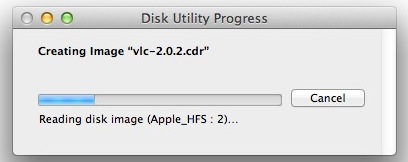
Quick DMG to CDR Conversion
Conversion happens very quickly and you’ll find the converted CDR file at the destination where you saved it. It’s also immediately visible in the Disk Utility sidebar if you want to do something else with the file.
Now if you want to get the CDR file to ISO format, there are a few easy ways to do that.

Converting the CDR to ISO the Easy Way

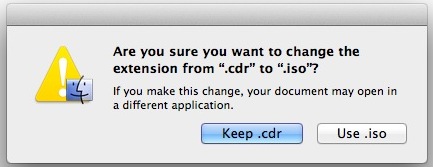
You can think of a .cdr as the Mac variation of a .iso disk image, and in fact you can often convert the cdr to iso just by renaming the file extension from the Finder. If you don’t have file extensions showing in Mac OS X you’ll need to do that first, then just rename the extension to .iso and accept the changes by selecting “Use .iso”.
Easy CDR to ISO conversion

It’s important to point out the file extension method typically works fine on a Mac but if you want to use the resulting image to burn a bootable disk, or burn it through Windows or Linux, you’ll probably want to go with the more complete method shown below.

Converting CDR to ISO via Command Line

If you want to be certain the ISO conversion and its headers are accurate, jump to the command line by launching Terminal, found in /Applications/Utilities/, and then using the following hdiutilcommand:
hdiutil convert /path/imagefile.cdr -format UDTO -o /path/convertedimage.iso
Be sure to plug in the correct paths for the both the input and output file.

الثلاثاء، ٣ ديسمبر ٢٠١٣

install OS X by recovery without usb flash or CD or internet + تقسيم الفلاشه وريكفري الماك

كيفيه تقسم الفلاشه علي الماك لاستغلا كل مساحه الفلاشه كما يجب
استرجاع نظام نسخه الماك عن طريق الريكفري بدون الحاجه الي نسخه ماك علي فلاشه او سي دي او تحميلها من الانترنت 
الريكفري للنسخه يحتاج مساحه ع الاقل ١ جيجا فقط 


تحميل OS X Recovery Disk Assistant

factory reset and install OS x by internet

factory reset of Mac air or pro, then download OS x by internet .
Go to recovery  (hold on Option+Power)

Notes: If you can't see Recovery , so try it (option+Command+R +power) then u will get recovery 

لللدخول الي الريكفري
الطريقة الأولى:
الضغط على مفتاحي Command) ⌘ + R)
بعد تشغيل الماك فوراً تضغط على المفتاحين .. حتى تظهر لك علامة أبل .. بعدها ترفع اصابعك عنهما
وهنا تبدأ عملية تشغيل نظام Lion Recovery في وقت قصير جداً (( أقل من دقيقة ))


الطريقة الثانية:
الضغط على مفتاح الإختيار (Option) ويحمل هذا المفتاح شكل ⌥
تقوم بالضغط عليه بعد تشغيل الجهاز ليعرض عليك الماك الأقراص التي تستطيع الإقلاع منها ..
وستجد قرص جديد في جهازك اسمه Recovery HD .. قم باختياره وأقلع منه ..

السبت، ٣٠ نوفمبر ٢٠١٣

السبت، ١٩ أكتوبر ٢٠١٣

الأربعاء، ٩ أكتوبر ٢٠١٣

الجمعة، ٤ أكتوبر ٢٠١٣

الأحد، ٢٢ سبتمبر ٢٠١٣

شرح تركيب نظام الويندوز على أجهزة الماك بستخدام الـ BootCamp

http://www.unlimit-tech.com/blog/?p=90991

الأربعاء، ٢١ أغسطس ٢٠١٣

الثلاثاء، ٢٠ أغسطس ٢٠١٣

Adobe Photoshop CC 14.0 Mac OS X


download Adobe photoshop cc 14:
http://www.gulfup.com/?7hvTW4

download Crack of Adobe Photoshop cc14:
http://www.gulfup.com/?1Wzltm

Explain:
http://www.youtube.com/watch?v=tRcWRL7tiZk


                                     -----------------------
                                         Another Way  

Torrent file with crack:


Explain:

الأربعاء، ١٢ يونيو ٢٠١٣